Select a point to play
Scroll/Pinch to zoom • Drag to move
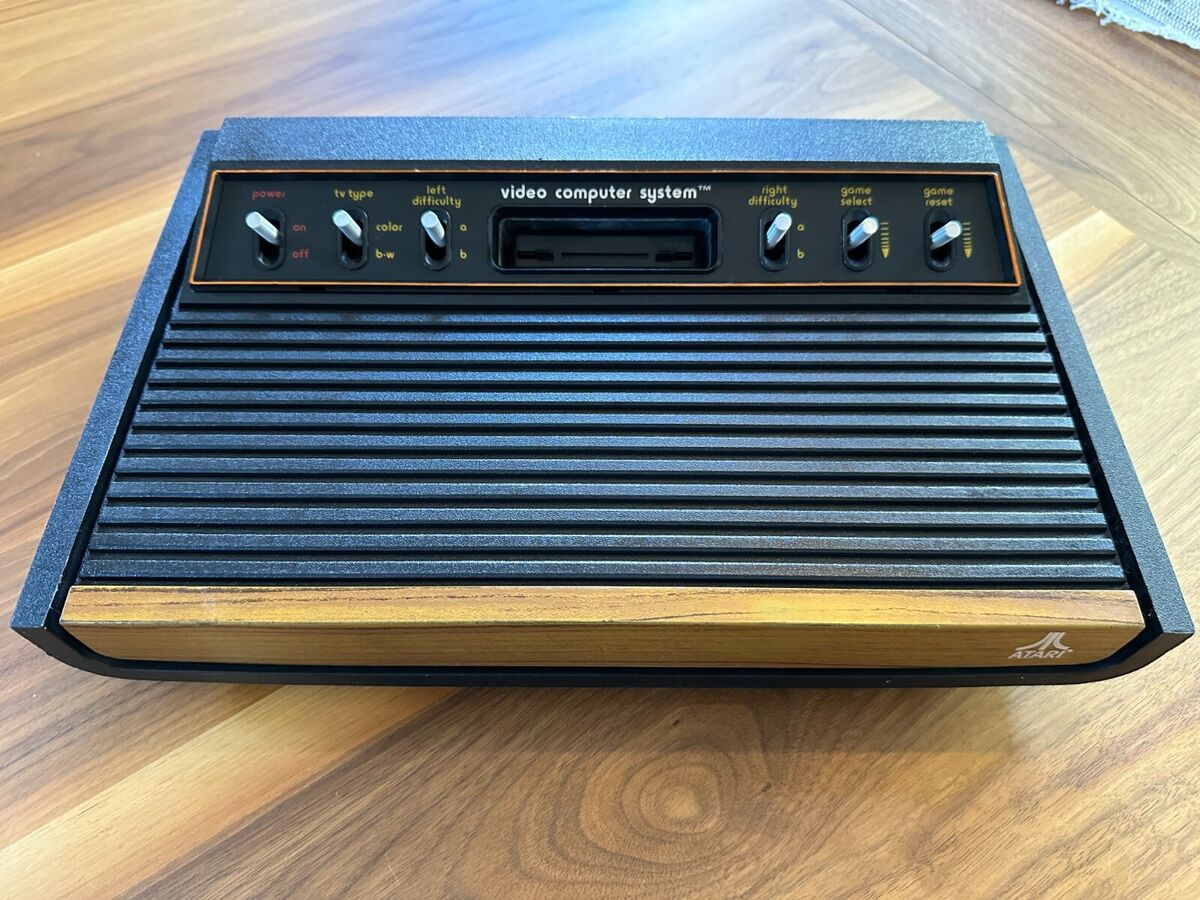
A
Power ON OFF
B
TV Type Color B-W
C
Left Difficulty
D
Right Difficulty
E
Game Select
F
Game Reset
G
Cartridge
Experience the Atari 2600 in a new way with interactive console model.
Each switch and the cartridge slot are marked with hotspots that you can click.
When you select a hotspot, a short video plays showing the physical action of pressing or toggling that specific button, and for the cartridge slot, a close-up video of inserting a cartridge.
Focuses on the hardware itself, letting you explore the console’s iconic controls up close.
Click around and enjoy a simple, tactile walk through one of gaming’s most legendary machines!
A- Power On Off
B- TV Type Color or Black and white
C- Left Difficulty A-B
D- Right Difficulty A-B
E- Game Select
F- Game Reset
G- Cartridge Slot